How it works Privacy Filing modes For teams Pricing Blog FAQ Join the waitlist
For Outlook & Microsoft 365

Your inbox, sorted by who sent it.

Sortfully files every message into a folder — or a coloured tag — by the organisation that sent it, and only once you've read it. It never reads your message bodies or attachments.

Content-blind by design · Private beta — join the waitlist for launch

Never reads your mail
Moves mail once you've read it
Tokens encrypted at rest
GDPR & UK-GDPR ready
Disconnect any time
No AI

No AI. Just rules you can read.

No model, no classifier, no LLM — and your mail is never sent to any AI service. Filing runs on plain, deterministic logic you can see and edit.

sender domain exact match Public Suffix List filed
How it works

Connect once. Forget about filing.

Set it up in a few minutes, then Sortfully runs hands-off in the background, filing new mail for you — by default, once you've read it.

01

Connect

Sign in with Microsoft. You'll see exactly which permissions are requested — and which we deliberately never use.

02

Scan & preview

We read your folder structure and rules — metadata only — and show the folders we'd create before anything moves.

03

Tune your rules

Keep your existing folders, group domains, exclude senders, and pick move-or-tag per organisation. Or just accept the defaults.

04

Stay sorted

New mail is filed for you automatically — by default once you've read it, or instantly on delivery if you prefer. Optionally clean up your existing backlog in one chunked, throttle-safe pass.

Two filing modes

Move it out, or tag it in place.

…or both.

Some people want a spotless Inbox. Others never want mail to leave it. Sortfully does both — and you choose per organisation.

Move

into a subfolder

The message leaves your Inbox for a clean, named folder. Best when you want a true zero-clutter inbox.

Gnotifications.github.comgithub
Wreceipts@wise.comPayments

Tag

with a coloured category

The message stays in your Inbox with a coloured label — one consistent colour you choose, applied to everything Sortfully tags. Filterable and tidy, but nothing disappears.

Thello@thetimes.co.ukthetimes
Nno-reply@notion.soTools

Mix freely — tag your newsletters, move your receipts. Mode lives on the mapping, not the mailbox, and every action is reversible.

Domain grouping

One organisation, one folder.

Sortfully groups by the sender's organisation, not the exact address — so every alias and subdomain from a company lands together, automatically.

  • Subdomains collapse. news@stripe.com and notifications.stripe.com both go to Stripe.
  • Correct names, every time. A real Public Suffix List handles .co.uk, .energy and hundreds more — no mangled folder names.
  • Your overrides win. Group stripe, paypal and wise into Payments, pin a domain to a folder you already have, or exclude it entirely.
Every alias & subdomain· one folder
Public Suffix List octopus.energy Octopus thetimes.co.uk Thetimes
The privacy guarantee

We can't read your email. Literally.

“We never read your mail” is easy to say. We enforce it in code — with a hard-coded metadata allow-list and a build that fails if anyone tries to look at content.

What Sortfully can & can't see
Enforced by engineering controls, not just policy.
Detailed logging on — the sender address & subject are saved to your log too.
Detailed activity log Also write the sender address and subject line to your log. Bodies & attachments are never read either way. Toggle to preview →
Sender domain & destination folderThe organisation a message came from, and the folder it's filed to. This is what we keep.
Received timeAlways recorded — it's routing metadata, so your log lines up with Outlook.
Sender addressRead in memory only to work out the domain, then discarded — never written to disk.
Subject linesNever requested, never read.
Message bodies & attachmentsExcluded from every query by an allow-list. Never readable — in either mode.
Sender domain & destination folderThe organisation a message came from, and the folder it's filed to. This is what we keep.
Received timeAlways recorded — it's routing metadata, so your log lines up with Outlook.
Sender addressNow written to your log too, so you can match it to Outlook — on by default, and you can switch it off during setup.
Subject lineNow recorded as well. Still only the subject — never the message body.
Message bodies & attachmentsExcluded from every query by an allow-list. Never readable — in either mode.
// Every message read is validated against a hard-coded allow-list. // GraphMailClient::selectFor() — routing metadata only: $select = [ 'id', 'from', 'parentFolderId', 'receivedDateTime', 'internetMessageId', 'categories', 'isRead', ]; // Stored: sender DOMAIN (from 'from') + destination folder. Nothing else. // Rejected in every query — CI fails the build if these appear: // 'subject' 'body' 'bodyPreview' 'uniqueBody' 'attachments'
// Same hard-coded allow-list, plus ONE field — and only through the // single reviewed enhanced-audit path: $select = [ 'id', 'from', 'parentFolderId', 'receivedDateTime', 'internetMessageId', 'categories', 'isRead', 'subject', ]; // Still rejected in every query — CI fails the build if these appear: // 'body' 'bodyPreview' 'uniqueBody' 'attachments'

One reviewed code path (GraphMailClient) ever touches your mailbox. Detailed logging adds only the subject, through that same path — bodies and attachments stay unreadable. Flip the switch above to see exactly what each mode selects.

Automatic & reliable

Filed on your terms — and never silently dropped.

Sortfully watches for new mail through Microsoft Graph and files it automatically — by default once you've read it, or the instant it arrives if you'd rather. Behind the scenes, it's engineered so nothing slips through the cracks.
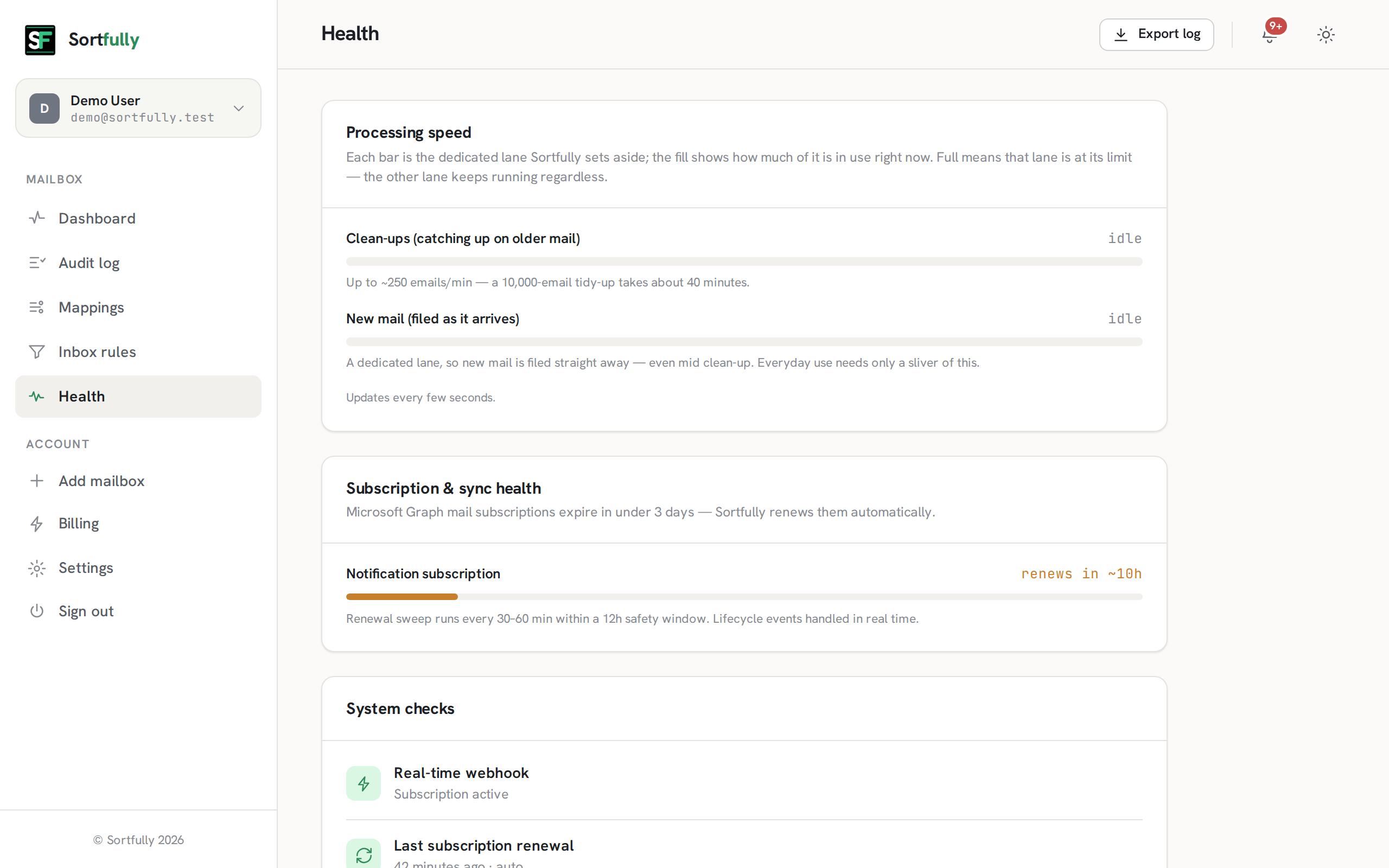
  • Filed on your schedule. By default, mail moves only after you've read it — so it never vanishes unseen. Switch to move-on-delivery whenever you like.
  • Webhook-driven. Real-time change notifications, not slow polling.
  • Self-renewing & gap-recovered. Subscriptions auto-renew and a delta sweep catches anything a missed event would have lost.
  • Throttle-safe cleanups. Backlog passes are chunked and rate-limited, so a 10,000-email tidy-up never trips Outlook's limits — and new mail keeps filing throughout.
  • Plays nicely with your rules. If a native Outlook rule already moved a message, Sortfully leaves it alone.
~2s
From read to filed
~250/min
Cleanup throughput
0
Bodies or attachments read
0
Emails sent to AI
portal.sortfully.app/health
Sortfully health page showing processing-speed lanes, subscription renewal status and system checks
portal.sortfully.app/team
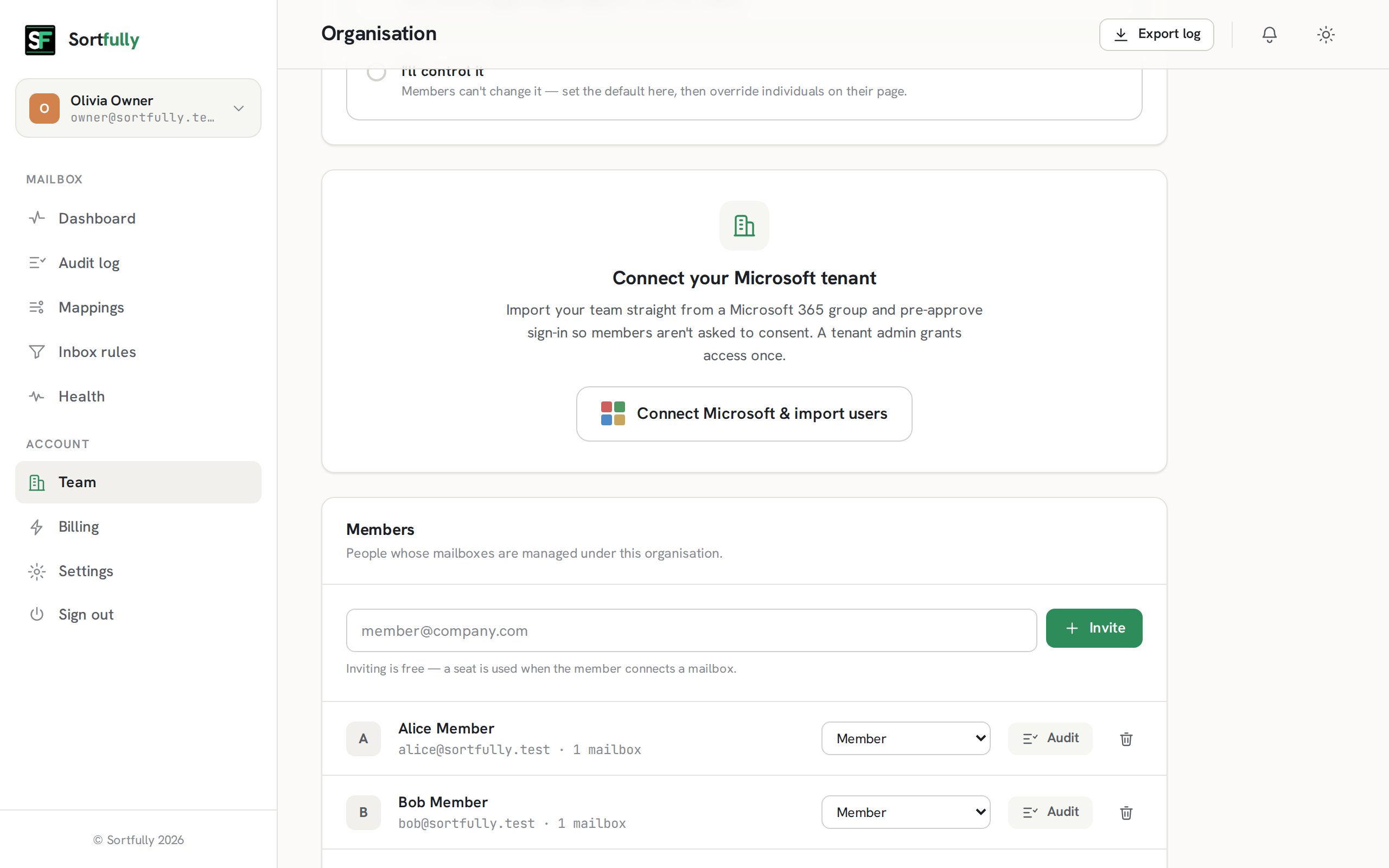
Sortfully organisation screen with seats, members, roles and Microsoft 365 tenant sync
For teams & business

Roll it out across the whole organisation.

Start with your own mailbox, or manage a team. Business adds the controls IT actually asks for — without ever widening what Sortfully can see.

Microsoft 365 tenant sync

Import members from a Microsoft 365 group and pre-approve sign-in, so nobody is asked to consent individually.

Roles, seats & delegation

Owners and admins manage seats, invite members for free, and delegate shared mailboxes to the right people.

Org-wide policy & audit

Set detailed-logging and retention policy for everyone, and review any member's metadata-only audit log.

Pricing

Simple, per-mailbox pricing.

One price per connected mailbox. Disconnect a mailbox and its seat frees up. Final pricing is still being confirmed.

Standard
Everything an individual needs to keep a tidy, private inbox.
TBC
Per connected mailbox · price to be confirmed
  • Automatic filing by sender domain
  • Move & tag modes, per mapping
  • Overrides, groups & exclusions
  • Backlog cleanup & undo
  • Multiple mailboxes on one account
Join the waitlist
For teams
Business
Everything in Standard, plus organisation management for IT.
TBC
Per connected mailbox · price to be confirmed
  • Microsoft 365 tenant & group sync
  • Roles, seats & shared-mailbox delegation
  • Org-wide logging & retention policy
  • Member audit access & admin undo
  • Priority support
Join the waitlist

Payments handled securely by Paddle. Cancel any time.

Security & compliance

It can sort your inbox. It can't read it.

Least-privilege access, encryption everywhere, and the paper trail enterprises expect.

Delegated, per-mailbox access

Each user consents only for their own mailbox — never tenant-wide app permissions. Admins can scope access further and consent on behalf of users.

Encrypted tokens

Refresh tokens are encrypted at rest, never logged, and rotated on Microsoft's schedule.

GDPR & UK-GDPR

Least-data retention, data-subject export and delete, and a clear DPA. Audit retention is yours to configure.

Two-factor & SSO

Email 2FA for password accounts with trusted-device support, or Sign in with Microsoft and let your IdP enforce MFA.

Exportable audit log

A clean, content-free record of every filing action, searchable and exportable to CSV within your retention window.

Right to disconnect

Cancel and we tear down every subscription and token. Your data leaves with you — cleanly and completely.

FAQ

Questions, answered.

No. Sortfully files by the sender address and routing metadata it needs — your message bodies and attachments are never requested, enforced by a hard-coded allow-list and a CI build gate that fails if anyone tries to access content, not just promised in a privacy policy. Subject lines are recorded only in your own activity log, through detailed logging — which is on by default and you can switch off at any time. Bodies and attachments are never read either way.
No — there's no AI anywhere in Sortfully. No model, no classifier, no LLM, and your mail is never sent to any third-party AI service. Filing runs on plain, deterministic rules you can see and edit — an exact sender match, then the Public Suffix List — so nothing about your messages is ever read, inferred, or used to train anything.
It groups mail by the sender's organisation domain using the Public Suffix List, so news@stripe.com and notifications.stripe.com both land in one stripe folder. You can add overrides, group several domains into one folder, pin a domain to a folder you already have, or exclude senders entirely.
Only if you want it to. Each mapping can either move a message into a subfolder, or tag it with a coloured category that keeps it in the Inbox. And by default, Sortfully only moves a message after you've read it — so nothing leaves your Inbox before you've seen it. Prefer a spotless inbox? Switch a mailbox to move mail immediately on delivery. You choose per organisation, and every action is reversible with a built-in undo.
Yes — you can switch any mailbox (or a single mapping) to file on delivery, so mail is sorted the moment it arrives. It's off by default for a reason: when a message is moved out of the Inbox the instant it lands, your phone's new-mail notification can be cleared or never shown, so you can miss it. By default Sortfully waits until you've read a message — your notifications behave normally and nothing leaves the Inbox before you've seen it. You choose per mailbox or per organisation.
During setup Sortfully detects your existing folders and inbox rules (metadata only) and lets you keep and reuse them, or reconcile anything that would conflict. Nothing is overwritten blindly, and messages are always moved — never deleted.
Microsoft 365 (work or school) and personal Outlook.com mailboxes, via Microsoft Graph. You can connect multiple mailboxes to a single Sortfully account, and businesses can manage many under one organisation.
Pricing is still being confirmed and will be announced before launch. Sortfully will be billed per connected mailbox, with Standard and Business tiers (Business adds team management). It's currently in a private, invite-only beta — join the waitlist and we'll email you when it's open to everyone.
Coming soon

Be first to know when Sortfully launches.

Sortfully is in a private, invite-only beta. Join the waitlist and we'll email you the moment it's open to everyone.

You're on the list — we'll email you when Sortfully launches.

One email when we launch, plus the occasional update — unsubscribe anytime.